FDE Build Project · HR · Attendance

Fingerprint access logs
become a clean attendance sheet

We automated attendance management for Sinstar Presents. Starting from raw, unpolished CAPS fingerprint access logs, and with almost no human touch, it handles per-employee work-hour calculation, automatic anomaly detection, automatic leave/field-work reconciliation, and a dashboard that surfaces only the exceptions.

🏢 Sinstar Presents (~19 employees) 👥 Management support admin 🧪 Dev POC, wrapping up
19 employeesAttendance managed automatically
342 / 342100% match with the check-in/out answer key
Only ~25%Need a final human check (the rest automatic)
Reason-focusedAnomaly reasons auto-collected via Slack

※ Accuracy and auto-processing rates are validation results comparing May 2026 data against the existing attendance sheet (the answer key).

The Challenge

CAPS only records — it doesn't organize

The fingerprint reader just dumps noisy access logs, so calculating work hours and judging anomalies fell to a person.

1

Raw data forces manual work

One person taps in/out, access, and release multiple times a day, so the logs are messy. Every month someone had to open them, organize by employee × date, and calculate work hours.

2

Normal vs. anomaly judged one by one, by a person

Lateness, under-hours, and missing punches had to be filtered by eye, and then whether it was a real problem (or normal because of leave or field work) had to be reconciled against separate filings and the calendar.

3

Leaders want reasons, not numbers

What they need to see is "why is this person often late or out on field work," but the old method left no capacity to attach reasons to the attendance sheet.

The Solution

From raw logs to reason collection, automatically

Just upload the raw file and work-hour calculation, anomaly detection, and leave/field-work reconciliation all run automatically, leaving only the exceptions for a person to review.

STEP 1

Upload raw logs

Upload the fingerprint-reader access log file.

STEP 2

Calculate work hours

Auto-derive actual hours from first-in and last-out.

STEP 3

Detect anomalies

Automatically find lateness, under-hours, missing punches.

STEP 4

Reconcile leave/field work

Auto-verify with filings and the calendar.

STEP 5

Reasons & report

Collect reasons via Slack + a leader report.

Feature ① · Input

Messy access logs into a work-hours sheet

Just upload the raw fingerprint-reader file, and it picks each employee's first "check-in" and last "check-out" for the day and calculates actual work hours (including a lunch deduction) automatically.

  • Automatically strips out noise like repeated access/release punches
  • Overnight work past midnight is correctly attributed to the prior day
  • The monthly manual cleanup and calculation disappears
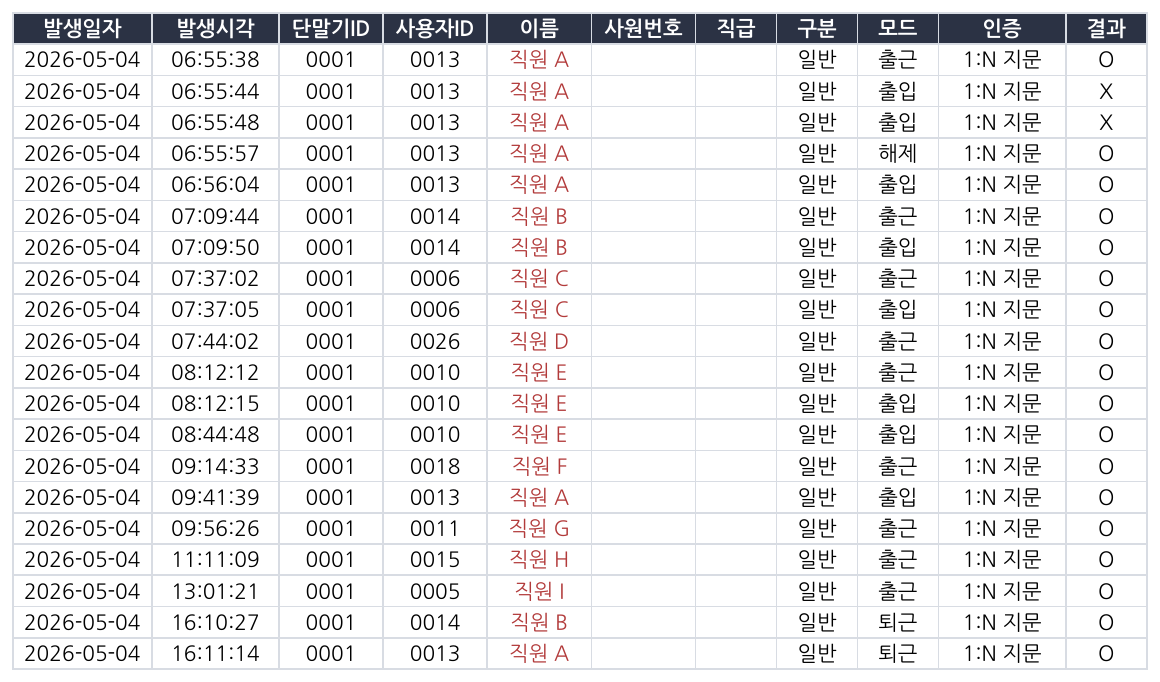
CAPS fingerprint-reader raw attendance data (employee names masked)
Input: raw fingerprint-reader access logs (employee names masked)
Feature ② · Calculate & detect

Work hours and attendance types judged automatically

It organizes each employee's check-in, check-out, and actual hours, and automatically labels attendance types like annual leave, half-half day, and training. Anomalies such as lateness, under-hours, and missing punches are found automatically and surfaced to an exceptions inbox for a person to handle.

  • The admin focuses only on filtered exceptions, not the whole set
  • The lateness tolerance (e.g. 20 min) is adjustable on screen — marginal cases auto-close
  • Click an exception and the check-in/out evidence appears right away
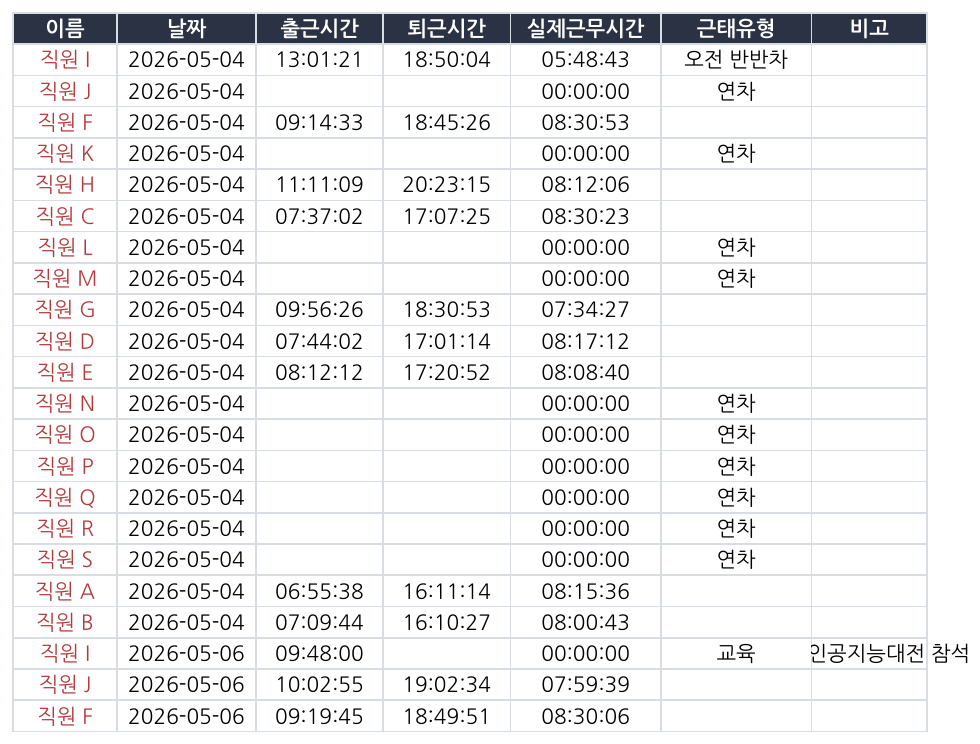
Per-employee check-in/out and actual hours + automatic attendance-type judgment (employee names masked)
Output: work-hour calculation + automatic attendance-type judgment
Feature ③ · Auto-reconcile

Reconciles leave and field work on its own to auto-resolve

If a day flagged as an anomaly is actually leave, remote work, field work, or training, the system finds the evidence and organizes it automatically. When confident it applies the result automatically; when unsure it escalates for a person to decide.

  • Reads leave/remote-work filings (from the drive) to auto-resolve that day's anomaly
  • For field work/training it judges from calendar events — if unclear, marked "pending approval"
  • Special arrangements like reduced hours for childcare are applied based on the approved filing
Day flagged as anomalyLate · under-hours · missing punch
Reconcile leave filings · calendarFind evidence and judge automatically
Auto-resolved / pending approvalConfident → auto, unsure → a person
Anomalies that are actually normal get cleared automatically
Feature ④ · Reasons & report

Asks for reasons via Slack, reports to leaders

When an attendance anomaly occurs, a bot asks the employee for the reason in a 1:1 message, and once they reply it's reflected in the inbox automatically. Leaders get a summary dashboard on a regular cadence.

  • Reasons are collected automatically, without the admin asking each time
  • Follows up automatically when there's no response
  • A leader summary and per-person detail are sent as images to Slack every two weeks
Attendance anomaly occursReason needs confirming
Slack bot asks the employee1:1 DM · re-sends if no reply
Reason applied + leader reportSummary sent every two weeks
Reasons gather automatically; leaders get just the summary
"More than the clock-in time, the 'reason' for lateness or field work matters most."

So instead of a plain timesheet, we made it gather the reasons behind anomalies automatically, so leaders can see the context.

The Impact

From organizing everything to checking exceptions

Operational metrics will be measured after formal rollout. Here are the results confirmed in the May data validation.

BEFORE
  • Raw data organized and calculated by hand each month, by employee × date
  • Anomalies, leave, and field work judged by a person via reconciliation
  • No capacity to attach reasons, so leaders saw only numbers
AFTER
  • 100% match with the check-in/out answer key, ~72% of attendance types auto-judged
  • Automatic leave/field-work reconciliation auto-resolves normal anomalies
  • Reasons auto-collected via Slack → a person checks only about 25%
Measurement accuracy
342 / 342

Comparing May 2026 check-in/out measurements cell by cell against the human-made attendance sheet, they matched 100%. The items needing a final human check dropped to about 25% of the total.

Status

Wrapping up the first POC

The measurement/verdict pipeline, inbox and dashboard, automatic leave/field-work resolution, and Slack-bot integration are complete. Next up are automatic CAPS integration (currently raw files are uploaded manually) and a redesign of the leader report.

Tech Stack

On a proven stack

The core: a rules engine that cleans up noisy raw logs, and the external integrations that judge leave and field work.

Python · Django · DRF PostgreSQL Claude · Gemini · OpenAI (swappable models) pdfplumber · xlrd Google Drive · Calendar API Docswave OpenAPI Slack bot crontab daily batch standarda-core