FDE Build Project · Document Ops

4.75 years of approval docs,
found in one sentence

We turned Sinstar Presents' 7,260 electronic-approval (Docswave) filings into a searchable database. With a single plain-language question like "summarize this year's transactions with NKT," you can find past filings, reconcile amounts, and catch duplicate payments.

🏢 Sinstar Presents 👥 Management support · Accounting 🧪 Dev demo complete (free POC)
7,260 docs4.75 years of approvals turned into a database
Natural-language searchAsk in words, get the source link
Duplicate detectionPrevents double-payment incidents
139 vendorsNaming variations normalized automatically
The Challenge

Approved — but impossible to find again

Once approved, documents just piled up as PDFs scattered across the drive, with no way to search a list or pull them into a spreadsheet.

1

Past filings you can't find by date

To answer "that payment to NKT three years ago — who filed it and why?", the filing date and the payment date differed, so pinning it down was hard and meant opening PDFs in the folder one by one.

2

Blind spots for duplicate payments

When a vendor mistook a paid item for unpaid and re-billed, the staffer sometimes couldn't tell it was the same item and filed twice — an incident that actually happened.

3

Messy data that can't be searched as-is

Vendor names lived only in titles, total-amount fields were blank, and the same project name was scattered across multiple spellings — a form no machine could search or aggregate.

The Solution

Organize once, then search instantly ever after

We turn scattered PDFs into searchable data (ingest & extract), and from then on you find anything instantly in plain language (query).

STEP 1

Ingest from drive

Read every approved PDF filing in bulk.

STEP 2

Extract & normalize

Pull vendor, amount, filer, date, item; unify spellings.

STEP 3

Searchable DB

7,260 docs into a single transaction database.

STEP 4

Natural-language query

Ask in words, get the answer plus the source link.

Feature A · Organize

Scattered filings into a searchable table

It reads the approval PDFs scattered across the drive, extracts vendor, amount, filer, date, and item, and builds one database. 4.75 years and 7,260 documents were organized in one batch, hands-free.

  • Vendor-name variations (Inc., spaces, abbreviations) unified into one — so the timeline stays unbroken
  • Only low-confidence values are routed to a human review queue automatically
  • Always linked to the source document — every extracted value can be verified against the original
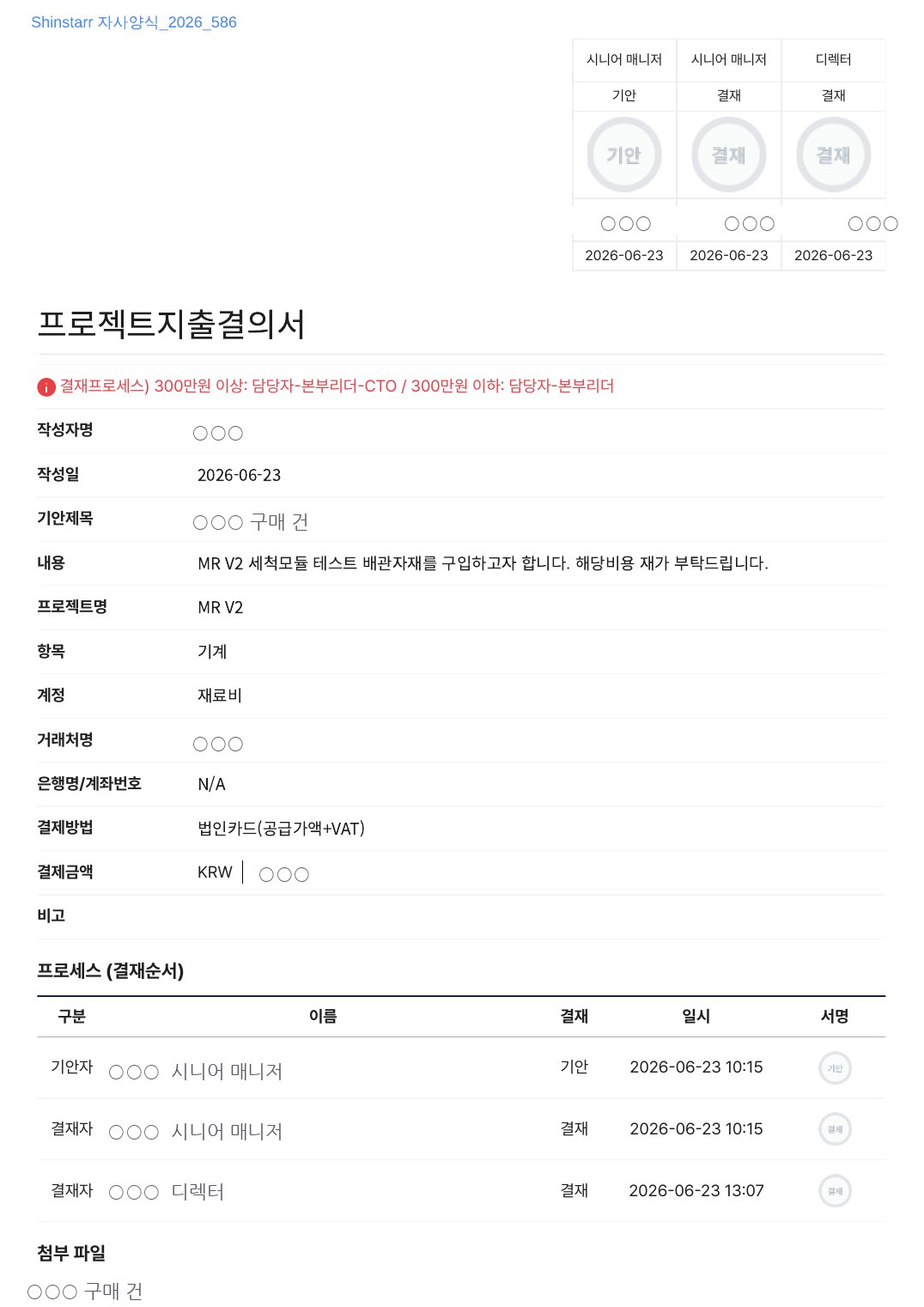
Docswave filing (project expense approval) example — vendor, amount, approval line (sensitive info masked)
Input: one real filing (names, vendor, and amounts masked)
Feature B · Core

A query console you talk to in everyday words

Ask the web search box the way you normally would, and it returns the answer along with the source drive link. Numbers can always be verified against the original, so there's no guessing and no silent errors.

  • Instantly look up vendor timelines, amount reconciliations, and duplicate candidates
  • Accurate totals and rankings across the full dataset (total spend, top vendors, etc.)
  • Every answer comes with its basis and a source link
Natural-language question"Summarize NKT's transactions this year"
DB search + summaryExact lookup, then answer assembly
Answer + source linkVerify against the source document
Ask → find → verify against the original
Just ask like this

The questions staffers actually ask

Repetitive folder-digging becomes a single sentence. (Actual queries used in the 2026-07-15 demo.)

Q

"Summarize NKT's transactions this year"

→ Lays out the transaction timeline with amounts and reasons, plus source links. It directly replaces the staffer's repetitive settlement work.

Q

"Any suspected duplicate payments?"

→ Pairs up candidates with the same vendor, same amount, and nearby dates. The demo detected 4 duplicate pairs.

Q

"Where does supply + tax not match the total?"

→ Automatically filters out documents where the amounts don't add up and flags them for review.

Q

"Last year's total spend / the biggest vendor?"

→ Computes accurate totals and rankings across the full dataset.

The Impact

Digging through folders becomes one search

Operational KPIs will be measured after formal rollout. Here are the changes confirmed in the dev demo so far.

BEFORE
  • Past items meant clicking PDFs one by one in folders near the payment date
  • Duplicate payments relied on the staffer's memory → risk of double payment
  • Spend totals and vendor rankings tallied by hand
AFTER
  • Transaction timelines pulled up instantly with one plain-language question
  • Same-vendor, same-amount, nearby-date duplicate candidates detected automatically
  • Accurate full-dataset totals and rankings, verified via source links
Turned into a database
7,260 docs

We turned 4.75 years (Sep 2021–Jun 2026) of approval documents into fully searchable data, unifying 139 vendor spellings and recovering 1,887 vendor links.

Status

Dev demo complete, incorporating feedback

Ingest, extraction, the query console, and the review screen were deployed and demoed on dev (2026-07-15). We're now incorporating real-use feedback — approval-comment fields, lookups by payment date, receipt-amount reconciliation, Excel export — and formal rollout will follow once the access-policy is finalized.

Tech Stack

On a proven stack

Search runs as exact database lookups, with the language model only for summaries. Numbers were designed to always be verifiable against the original.

Django PostgreSQL (JSONB) Claude Sonnet (extraction · summary) pdfplumber + LLM parsing Google Drive API (read-only) Deterministic search tools + response cache standarda-core Vanilla HTML/CSS/JS