Customer Case Portfolio · Tax · Accounting

Upload the tax adjustment statement,
and the corporate tax report is done

We automated corporate income tax report writing for Expert Tax Firm, Gangnam branch. Upload the client's tax adjustment statement PDFs (current and prior year), and it pulls the key figures automatically, compares them year over year, and produces a corporate tax analysis report in PDF and Excel — charts and summary comments included.

🏢 Expert Tax Firm, Gangnam branch 👥 Tax staff · tax accountants ✅ Applied in filing work
66p·23 forms
→ 4p
Tax adjustment statement → summary report
Current · priorTwo years auto-compared
PDF + ExcelBoth formats generated at once
Charts · comments8 report sections written automatically
The Challenge

The report work that repeated every filing season

Pulling figures from a thick tax adjustment statement and reorganizing them into a client report happened over and over.

1

Extracting figures one by one from a thick document

Items like revenue, profit, SG&A, and tax had to be picked out of a 66-page, 23-form tax adjustment statement and reorganized into a separate summary.

2

Comparing this year to last by hand

Placing two years' documents side by side, calculating change amounts and rates, and writing comments on the notable shifts — all by hand.

3

Re-editing a client-ready "presentable" doc every time

The formatting and editing that repeats for every company all piled up during month-end filing season.

The Solution

One PDF upload completes the analysis report

The extract → compare → edit the staff used to do, finished just by uploading the tax adjustment statement.

STEP 1

Upload PDF

Upload the client's tax adjustment statement (current · prior year).

STEP 2

Auto-recognize · organize

Pull key figures and organize by company and year automatically.

STEP 3

Compare · comment

Auto-write year-over-year changes, charts, and summary comments.

STEP 4

PDF · Excel output

Export to both formats after review and edits.

Core feature

Corporate tax analysis report, written automatically

Upload the tax adjustment statement PDF and the agent reads the document, pulls the key figures, compares to the prior year, and produces an analysis report — charts and summary comments included.

  • Extracted from the document automatically, with no manual transcription
  • Upload multiple clients' PDFs at once and they're organized by company and year (current / prior)
  • Auto-calculates year-over-year changes and key shifts, and even writes summary comments
  • Auto-generates P&L comparison, SG&A composition, and financial position charts
  • Output in both PDF and Excel; the owner and comments can be edited before export

Input example — tax adjustment statement cover (2nd fiscal year)
Input: client's tax adjustment statement PDF (current · prior year)
"Small businesses are often handled by the owner directly, so demand for automation is high."

The goal was to automate the repetitive report writing so staff can focus on review and advisory during filing season.
Seen in data

A 66-page document becomes a 4-page report

A real example of a complex tax adjustment statement (input) turning into an easy-to-read corporate tax analysis report (output). (Sample data; business number and representative name masked.)

Input
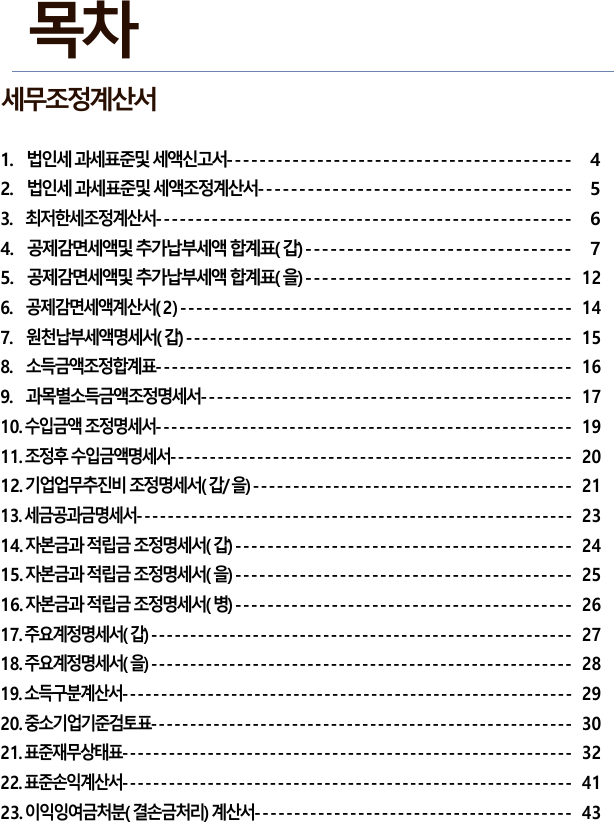
Tax adjustment statement table of contents — 23 forms
① The tax adjustment statement — 23 forms, 66 pages. This is where staff had to pick out the figures.
↓  Auto-recognize · compare · calculate · generate comments  ↓
Output 1
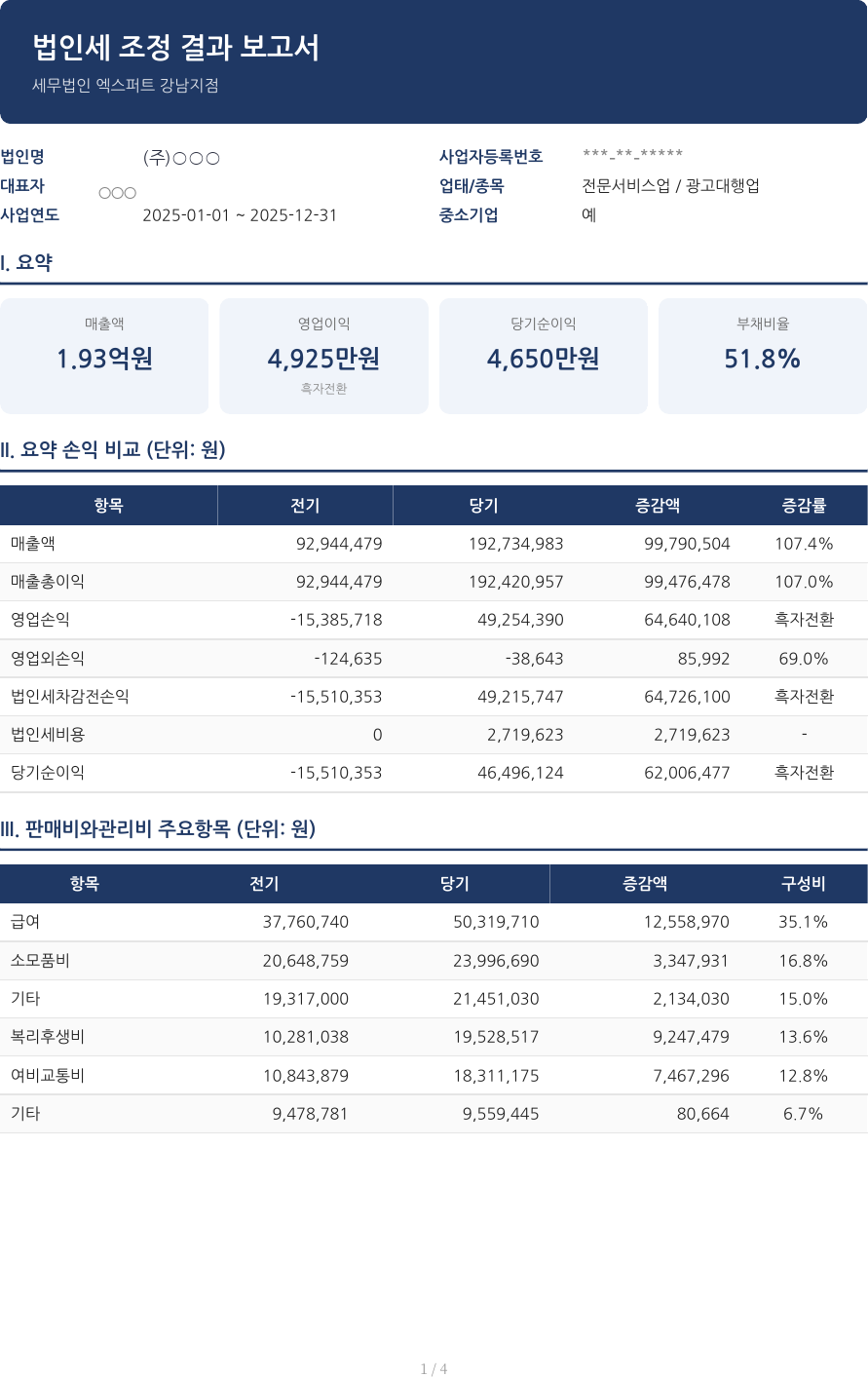
Corporate tax analysis report summary — summary cards, P&L comparison, SG&A
② Summary cards (revenue · operating profit · net income · debt ratio) · year-over-year P&L comparison · key SG&A items
Output 2
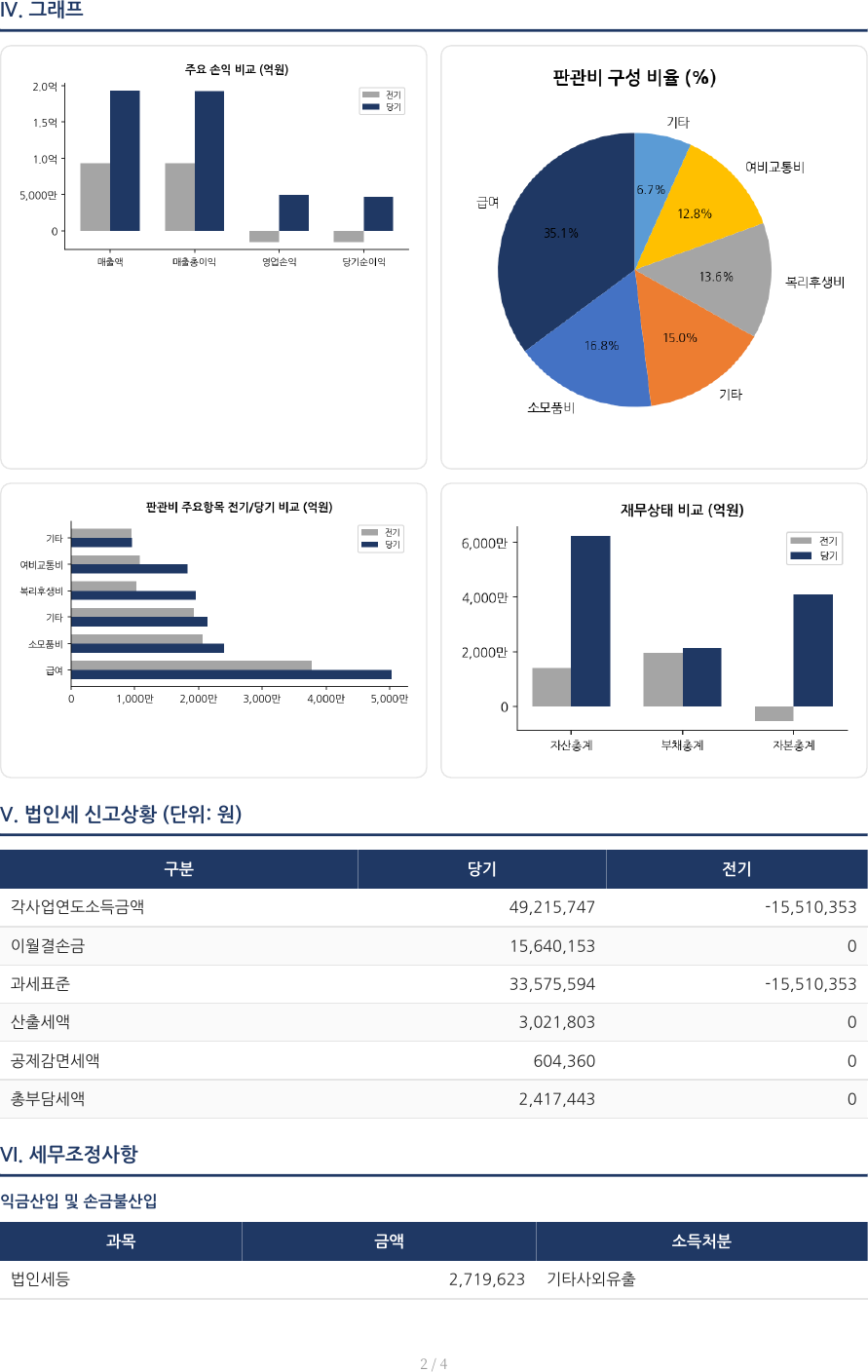
Corporate tax analysis report charts — P&L, SG&A, financial position + filing status
4 chart types for P&L, SG&A, and financial position + corporate tax filing status and tax adjustment items, organized automatically
Output 3
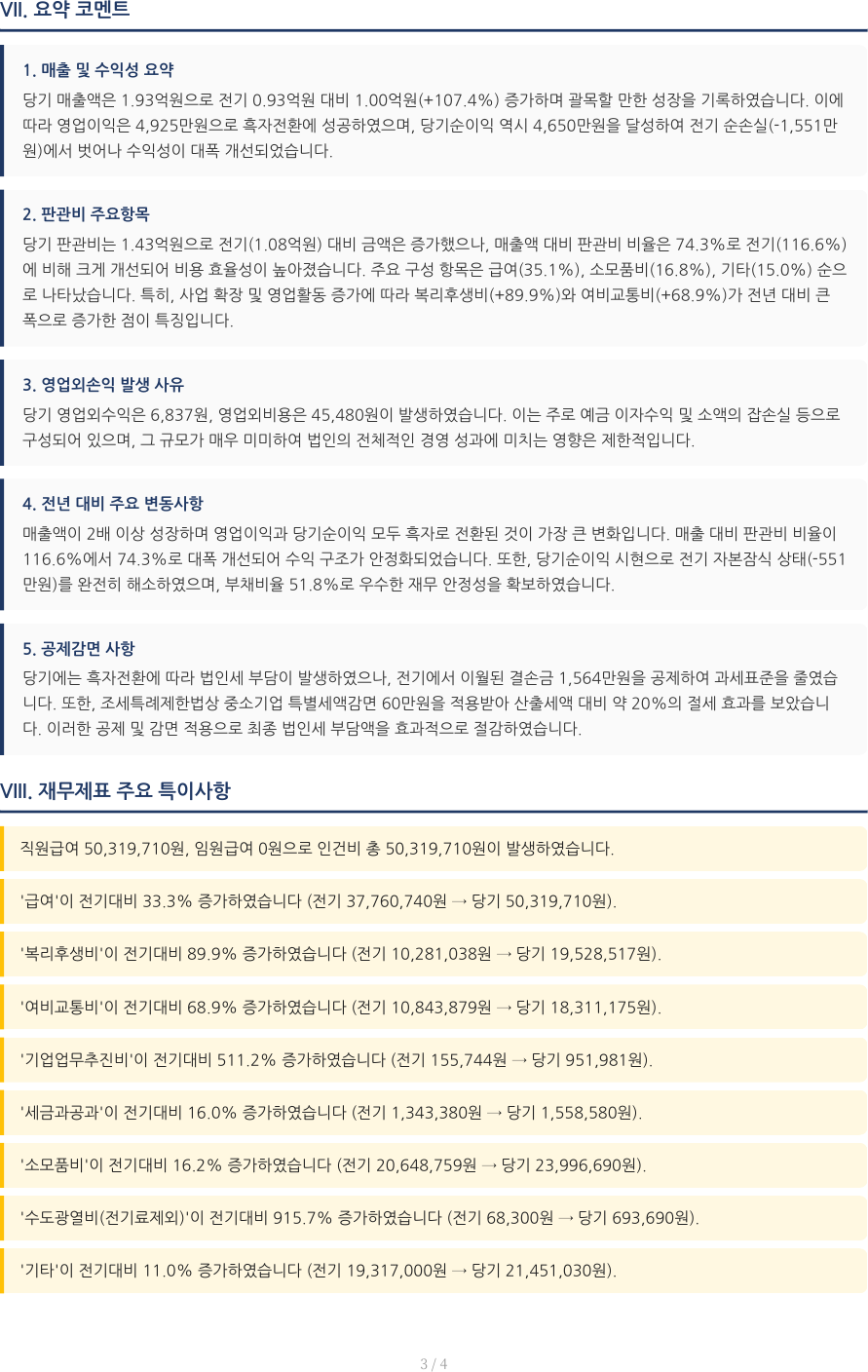
Corporate tax analysis report auto comments — summary comments, financial anomalies
Summary comments on revenue, SG&A, year-over-year, etc., and anomalies like advance payments and sharp labor-cost swings, written automatically
The Impact

Extract, compare, edit — cleared away

Staff only review and fine-tune; the agent handles the repetitive work.

BEFORE
  • Extracting and organizing figures by hand from a 66-page, 23-form document
  • Comparing this year to last by hand, writing changes and comments
  • Re-editing the client report for every company
AFTER
  • A 4-page analysis report (PDF · Excel) auto-generated just from a PDF upload
  • Year-over-year changes, charts, summary comments, and anomalies, all automatic
  • Staff just review, fine-tune, and export
Document summary
66p → 4p

A 66-page, 23-form tax adjustment statement is condensed into a 4-page corporate tax analysis report (PDF · Excel) just by uploading the PDF.

Adoption approach

Applied directly to filing work

We provide initial technical advisory for free and collaborate by applying it to real month-end filing work, testing it, and folding in feedback.

Tech Stack

Built on a proven stack

The keys are document recognition that reads thick tax documents, and a language model that produces human-sounding comments.

Django 4.2 Django REST Framework Claude Vision (document recognition) WeasyPrint (PDF generation) openpyxl (Excel) matplotlib (charts) standarda-core Vanilla HTML/CSS/JS