FDE Build Project · Accounting · Distribution

800 receipts a day to reconcile,
only the ones worth checking

We automated receipt reconciliation for Namdo Market, a Dongdaemun wholesale hub. AI reads the handwritten and POS receipt photos that pile up daily, auto-reconciles them against the settlement spreadsheet, and hands a person only the few where the amounts don't match. The original spreadsheet is never modified.

🏢 Namdo Market (Dongdaemun wholesale) 👥 Settlement staff · Reviewers 🧪 Running & validating on dev
800/dayReceipts reconciled by hand (automation target)
82% auto-passedPeople only check the mismatches
6 / 6 caughtEvery human-correction error auto-detected
Original untouchedEdits kept as records only — audit trail

※ Auto-pass rate and detection figures are sample-validation results from real data on 6/23 and 6/26 (pre-continuous-operation).

The Challenge

Every evening, 800 receipts matched by hand

Volume doubled in a few months, and reconciliation was overtime work that could only start after 6 p.m.

1

800 receipts a day matched one by one, by eye and hand

The staffer matched each physical receipt handed over by a vendor against the amount in the settlement spreadsheet. It took about 2 hours a day, and the volume kept growing.

2

Handwritten receipts are hard to read

Bad handwriting (8 vs 5, 1 vs 7), vendors that write items as numbers only, faded stamps and shop names — even a person had to guess the vendor. New vendors were riskier still, with no handwriting history.

3

A mistake is instantly a money problem

Miss a mismatch and a wrong amount gets paid out in bulk. Vendor entry errors and reviewer errors mixed together, producing dozens of amount discrepancies every day.

The Solution

Matches auto-pass, mismatches go to a person

Upload the receipt photos: clear matches pass automatically, and the staffer confirms only the few mismatched items, each with its evidence.

STEP 1

Upload receipts

Handwritten/POS receipt photos + settlement spreadsheet.

STEP 2

AI reads them

Extract shop name, amount, and items from the image.

STEP 3

Auto-reconcile amounts

Match against the spreadsheet and sort into buckets.

STEP 4

Only what to check

Only mismatches go to a person, with evidence.

STEP 5

Close & transfer file

Generate the corrected copy and bulk-transfer file.

Feature ① · Reading

AI reads even handwritten receipts

AI reads both POS receipts (half) and handwritten ones (half) to extract shop name, amount, and items. When the shop name is faded or misread, it reinforces the reading using the account and business-registration numbers.

  • Reads both handwritten and POS receipts (once per image)
  • Normalizes misread shop names to the canonical business name
  • Uses account and business-registration numbers as evidence to reinforce name reading
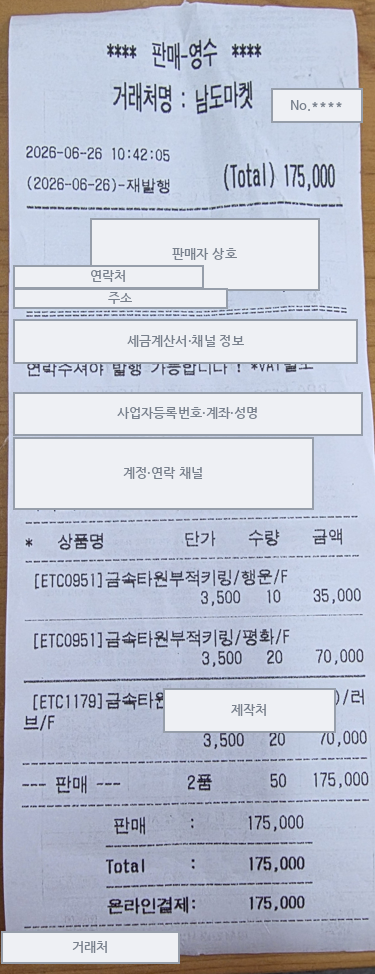
Example receipt to be read (shop name, contact, business number, account masked)
Input: a real receipt (shop name, contact, business number, account masked)
Feature ② · Core

Auto-reconcile against the spreadsheet → point out only what to check

It matches the read amount against the settlement spreadsheet, auto-passes exact matches, and flags only the mismatches as "amount discrepancy." Instead of 800 receipts, a person sees only the handful that don't match.

  • Matches in order: exact match → VAT tolerance → digit-error back-tracing
  • Auto-passed items are bulk-approved with one button
  • Never auto-confirms even with a single candidate — the final call is a person's
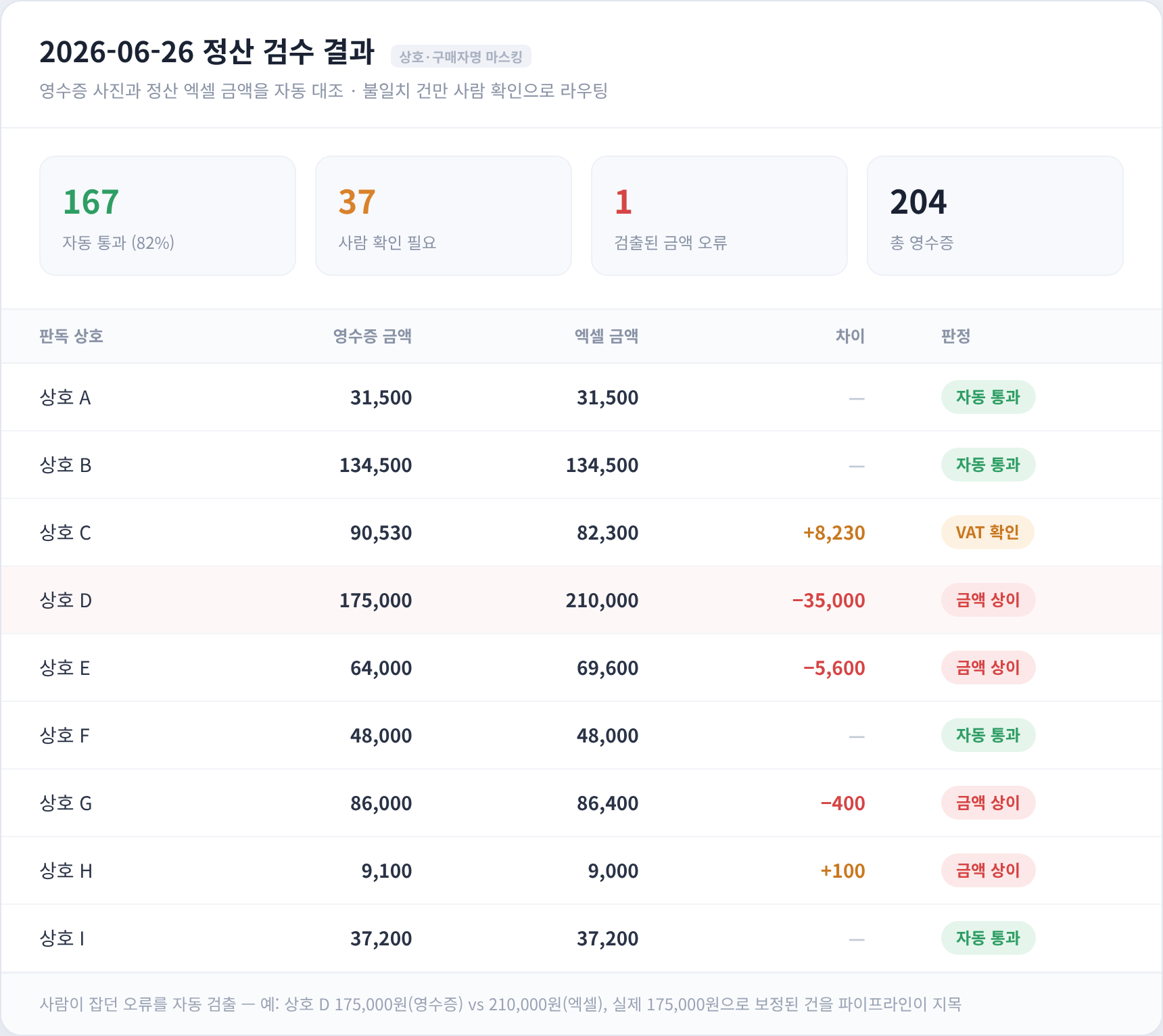
Settlement review table — auto-pass / amount-discrepancy flags (shop names anonymized)
Output: auto-reconciliation results — only mismatches flagged (shop names anonymized)
Feature ③ · Safety

The original spreadsheet is never touched

Because settlement means real money, we never edit the original file directly. Only the decisions a person makes are stacked separately, and at download time they're turned into a "corrected copy" and a bank bulk-transfer file.

  • Original immutable + decisions kept separate — the basis for each change remains for audit
  • Re-uploading the photos/spreadsheet preserves decisions already made
  • After confirmation, the corrected settlement copy + bulk-transfer file are generated automatically
Original settlement spreadsheetPreserved as-is, never modified
Only human decisions recordedConfirmations and corrections stored separately
Corrected copy + transfer fileGenerated at download time
Original stays put, decisions kept apart
Receipt says ₩175,000 but the spreadsheet says ₩210,000 — this is what it catches automatically.

The errors a person used to catch through overtime (e.g. a −₩35,000 gap) are flagged by the pipeline, so the staffer only has to check those.

The Impact

From reconciling everything to checking exceptions

Operational KPIs will be measured after formal rollout. Here are the results confirmed in real-data sample validation.

BEFORE
  • 800 receipts a day matched one by one for about 2 hours after 6 p.m.
  • A missed mismatch meant a wrong amount paid out in bulk
  • Editing the original file directly made audit trails hard
AFTER
  • 167 of 204 (82%) auto-passed; a person checks only 37
  • All 6 human-correction errors across 6 days were auto-detected
  • Original immutable + decision records make audit trails possible
Auto-pass
82%

Of 204 real receipts, 167 auto-passed and a person checked only the remaining 37. Auto-passed items are bulk-approved with one button.

Accuracy

Doesn't miss the errors people used to catch

Across 6 days of data, the pipeline detected all 6 amount errors a person had corrected (e.g. 210,000 → 175,000). It flags mismatches together with the evidence.

Tech Stack

On a proven stack

The key: only the reading is done by AI, while amount reconciliation and audit rules run as reproducible, deterministic code.

Django · DRF PostgreSQL Vision LLM (Claude · Gemini, OCR) Deterministic audit · matching openpyxl (original immutable) Pillow standarda-core LangSmith